
Real Estate Automation
Real Estate Investor CRM Automation Implementation
Real estate investor CRM automation works best when seller leads, property context, follow-up, pipeline stages, and human handoffs have clear owners.

TL;DR
- Map lead source, seller, property, opportunity, appointment, offer, and follow-up states before building automation.
- Keep one CRM record authoritative for ownership, pipeline stage, next action, and communication status.
- Use automation for intake, routing, reminders, task creation, status checks, and routine follow-up, not valuation or negotiation judgment.
- Require acceptance tests for duplicate handling, reply stops, reassignment, stale leads, failed messages, and human escalation.
- Buy implementation help when the hard part is connecting systems and ownership rules, not learning one CRM screen.
What a real estate investor CRM automation implementation should solve
Real estate investor operations often start with several lead sources feeding one acquisitions process. A seller may arrive from a website, direct mail response, referral, paid lead source, inbound call, or imported list. The CRM must answer a small set of operational questions without forcing the team to reconstruct the story from texts, notes, and spreadsheets.
The core questions are: who owns the lead, which property is involved, what stage is active, what happened last, what action is due next, and whether the seller has replied or opted out of a sequence. If those fields are unreliable, adding more automation creates faster confusion.
A useful implementation makes those answers visible first. Automation can then move the record, create tasks, notify the right person, start or stop follow-up, and surface exceptions without becoming a second hidden system of record.
Use a seller lead ownership map before choosing workflows
HWA uses an ownership map to separate business state from message activity. It gives each important fact one home and one reset condition.
| State | Authoritative owner | Automation job |
|---|---|---|
| Lead source | CRM contact or opportunity | Normalize and tag the source on entry |
| Property context | Defined property fields or related record | Capture address and intake details without overwriting another deal |
| Acquisitions owner | CRM assignment | Route, notify, and reassign by rule |
| Pipeline stage | CRM opportunity | Create tasks and follow-up from stage changes |
| Seller response | Conversation plus CRM state | Stop or branch routine follow-up and alert a person |
| Next action | CRM task or due field | Create, remind, escalate, and report overdue work |
This map is narrower than a generic CRM setup checklist. It is designed to prevent the common failure where one tool thinks a seller is new, another thinks the deal is active, and a third keeps sending a sequence after a person has taken over.
Make lead intake deterministic before adding nurture
A new seller lead should enter through a defined path that sets source, owner, property context, initial stage, and next action. Follow Up Boss documents Lead Flow rules that can connect a source, choose a distribution rule, and attach follow-up automation to that source.
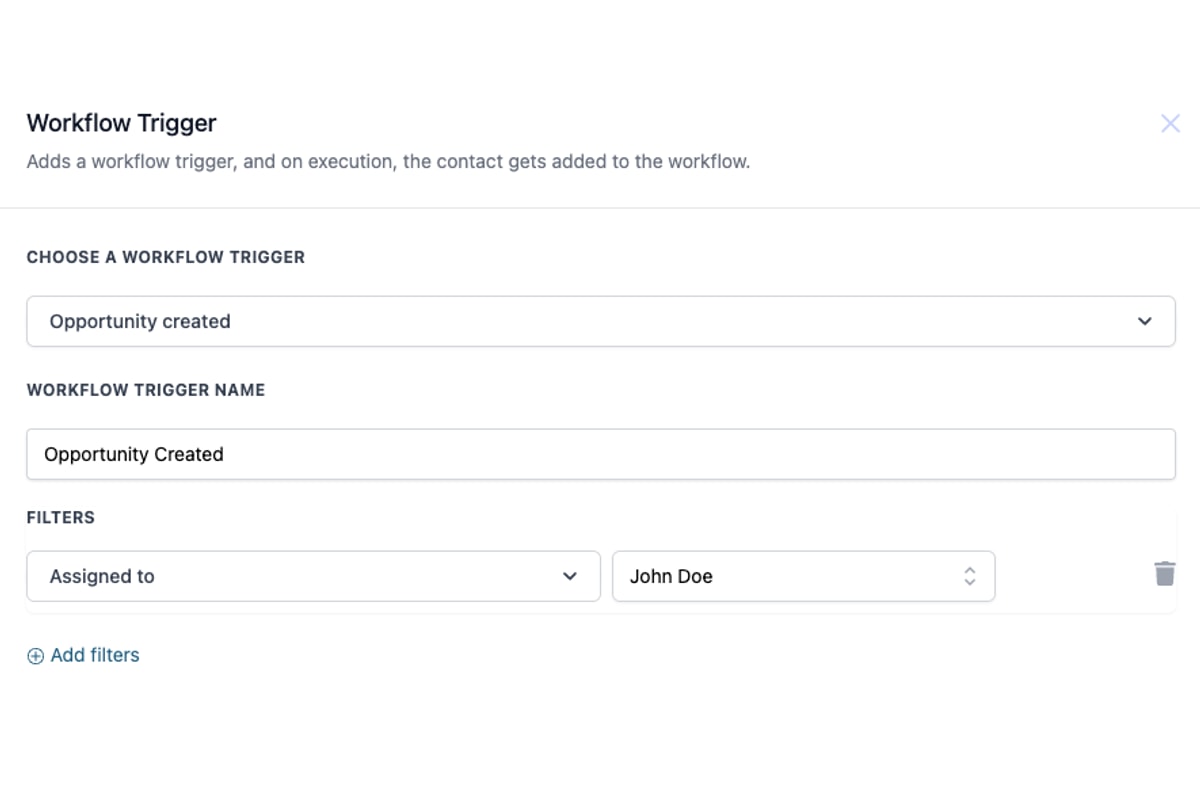
HighLevel documents an Opportunity Created trigger that can start workflow actions when a new pipeline opportunity is created.
The products differ, but the implementation question is the same: what event proves that a new opportunity exists, and which system is allowed to create it? Pick one answer. If both an integration and the CRM can create the same opportunity, duplicate prevention must be tested before live leads arrive.
For real estate investors, the data model needs extra attention because one person may be tied to more than one property or opportunity. HighLevel also documents workflows that can handle multiple opportunities for one contact. That makes the contact-to-opportunity boundary a design decision, not a field-mapping afterthought.
Build follow-up around response state, not a fixed message count
Routine follow-up can handle a large amount of repetitive work, but the sequence should react to state. A reply, appointment, disqualification, opt-out, ownership change, or active negotiation should change what happens next.
Follow Up Boss describes Automations 2.0 as the successor to its earlier action-plan model, with lead-flow assignments moving into automations. HighLevel's Opportunity Changed trigger can react to changes such as assignment, pipeline, custom fields, and other opportunity data. Those controls are useful only when the team has agreed on which changes mean continue, stop, hand off, or create a task.
The safe implementation pattern is explicit: trigger, eligibility check, action, stop condition, exception path, and final state. Every follow-up branch should tell an operator where the record will land if delivery fails or the seller responds with something the workflow cannot classify.

Keep human judgment at the offer and negotiation boundary
CRM automation can collect property details, route a task, calculate an internal field from approved inputs, schedule a call, and move a record after a verified event. It should not invent repair estimates, decide seller motivation, approve legal terms, or negotiate an offer without a clearly authorized human process.
A useful handoff state contains the seller, property, source, recent messages, known constraints, appointment status, and the exact question a person needs to answer. The workflow should resume only after that decision is recorded in a field or stage the automation can read.
This boundary also makes recovery easier. When the automation cannot continue, it creates a named exception instead of silently guessing. The acquisitions manager can then resolve the issue and return the record to a known state.
Test the failure paths before the happy path gets volume
A demo that creates one lead and sends one message is not an implementation test. Real acceptance testing should cover the cases that make investor pipelines messy.
- A duplicate seller arrives from a second source.
- The same seller has a second property.
- An assigned acquisitions rep changes.
- A seller replies while an automated sequence is active.
- A message fails or a required field is missing.
- An appointment is booked, moved, canceled, or missed.
- A lead becomes stale and needs a defined recovery path.
- A record is marked dead, won, lost, or do-not-contact.
Each test needs an expected final state. Pass or fail should be visible in the CRM, not inferred from a workflow canvas.

What an implementation partner should deliver
If you hire outside help, buy a defined operating result rather than a bundle of workflow screenshots. A useful scope names the systems, records, triggers, fields, owners, handoffs, tests, documentation, and support boundary.
- Current-state map of lead sources, CRM records, calendars, messaging, and reporting.
- Target-state seller lead lifecycle with one owner for each important state.
- Field and pipeline design that handles multiple properties or opportunities without accidental overwrites.
- Workflow build with response stops, exception handling, and human escalation.
- Test cases with pass criteria and a record of results.
- Operator documentation that explains how to pause, repair, and change the system.
- A post-launch review window for defects found under real traffic.
This is also the line between software support and implementation consulting. A software vendor can explain its own features. An implementation partner is responsible for how your lead sources, CRM, communication rules, team ownership, and recovery paths work together.
Use a 30, 60, and 90 day operating plan
The first 30 days should prove one high-value path, such as seller lead intake through assigned follow-up and booked acquisitions call. Measure whether records enter with the required fields, ownership is correct, reply stops work, tasks appear, and exceptions are visible.
By day 60, add the next bounded workflow only if the first one is stable. Common additions include missed-call recovery, stale-lead reactivation, appointment follow-up, or reporting. Avoid expanding while the team is still repairing duplicate records or unclear stages.
By day 90, the business should have documented ownership, a small set of verified workflows, and a maintenance process for changes. The target is not maximum automation. The target is a pipeline that the acquisitions team can trust.
Related HWA implementation guides
Sources
Want the first workflow proved before a full build?
Help With Automation can map one real estate investor workflow, test it against your current CRM and lead sources, and give you a clear build recommendation.
Book a discovery call