
The 4 Stages of Process Automation
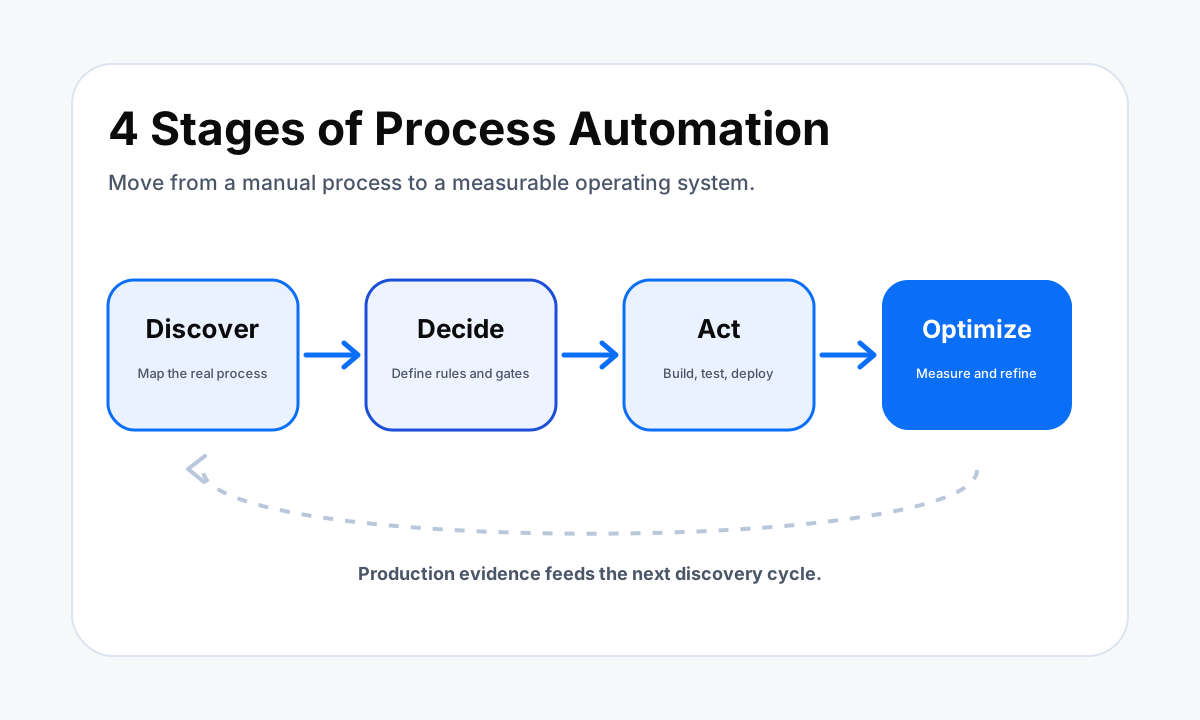
The 4 stages of process automation give a business a practical path from a messy manual workflow to a controlled system that can be measured and improved.
TL;DR
- Discover means mapping the current process, finding bottlenecks, and choosing a workflow that is worth automating.
- Decide means defining rules, data requirements, ownership, exceptions, approvals, and the result the workflow must produce.
- Act means building the workflow, testing normal and edge cases, deploying it in a controlled way, and documenting ownership.
- Optimize means using production evidence to refine rules, fix failure modes, remove unnecessary handoffs, and keep the automation aligned with the real process.
What Are the 4 Stages of Process Automation?
A useful four-stage model is Discover, Decide, Act, and Optimize. IBM describes those four steps as a way organizations can complete a business automation process. The labels are simple, but each stage answers a different operating question. Discover asks what is really happening today.
Decide asks what should happen in the future and which rules belong in the system. Act turns that design into a working automation. Optimize uses real operating data to improve what was deployed.
The model should not be treated as the only valid automation framework. Microsoft Power Automate, for example, separates an automation project into Plan, Design, Make, Test, and Deploy and refine. That is more granular, but it describes much of the same work. Planning and design fit inside Discover and Decide.
Making, testing, and deployment fit inside Act. Refinement fits inside Optimize. The important point is not the vocabulary. The important point is that a business does not jump from a vague pain point straight into building software.
For a small business, this sequence is especially useful because it creates decision gates. A process has to earn the right to be automated. The rules have to be clear enough to test. The workflow has to prove that it behaves correctly before the team depends on it.
Once it is live, its performance has to be observable. That keeps automation tied to an operating problem instead of turning it into a collection of disconnected tools.
Stage 1: Discover the Process Worth Automating
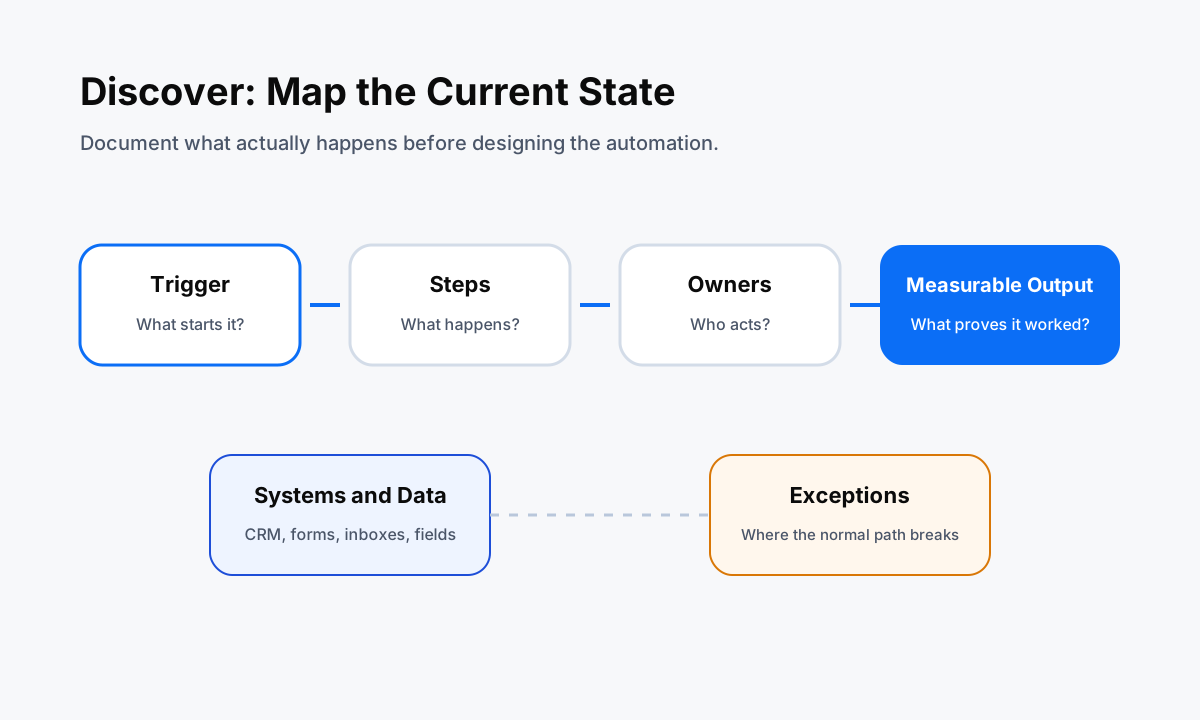
Discovery starts with the current process, not with a tool. IBM's business process automation guidance recommends identifying candidates that contain repetitive work, time sensitivity, high volume, or several people in the execution path. It also emphasizes documenting the steps, responsible parties, and timing.
That is a practical filter because the easiest task to automate is not always the task that matters most.
Start by naming one process in plain language, such as "new website lead to booked consultation" or "approved invoice to payment record." Then write down the trigger, every system touched, every person involved, the required data, the normal sequence, and the exceptions.
If the process changes depending on lead source, service type, payment status, or customer response, those branches belong in the map. Hidden branches are one of the main reasons a workflow looks correct in a diagram but fails in production.
Discovery should also capture the field that tells you the process has a problem. That might be response time, queue age, number of handoffs, duplicate records, unassigned leads, failed runs, or manual follow-up still required after an automation fires. The field does not need to be sophisticated.
It needs to connect the automation project to an observable condition. If there is no observable problem and no useful outcome, there is little reason to automate the process yet.
A good discovery output is a current-state map that another person can read without asking the process owner to fill in missing steps. If the team cannot explain the current state, the next move is usually more observation, not more software.
HWA uses this same logic in a workflow audit: understand the real operating path first, then decide whether automation is worth building.
Stage 2: Decide the Future-State Rules
Once the current state is clear, the work shifts from observation to design. Decide does not simply mean choosing Zapier, Make, n8n, HighLevel, or another platform. It means deciding what the system is allowed to do, what data it must have, and what should happen when the normal path breaks. The tool comes after those decisions.
Define the trigger precisely. "When a lead comes in" is too vague if leads can arrive from a website form, a phone call, a marketplace, or a CRM import. Define required fields and validation rules.
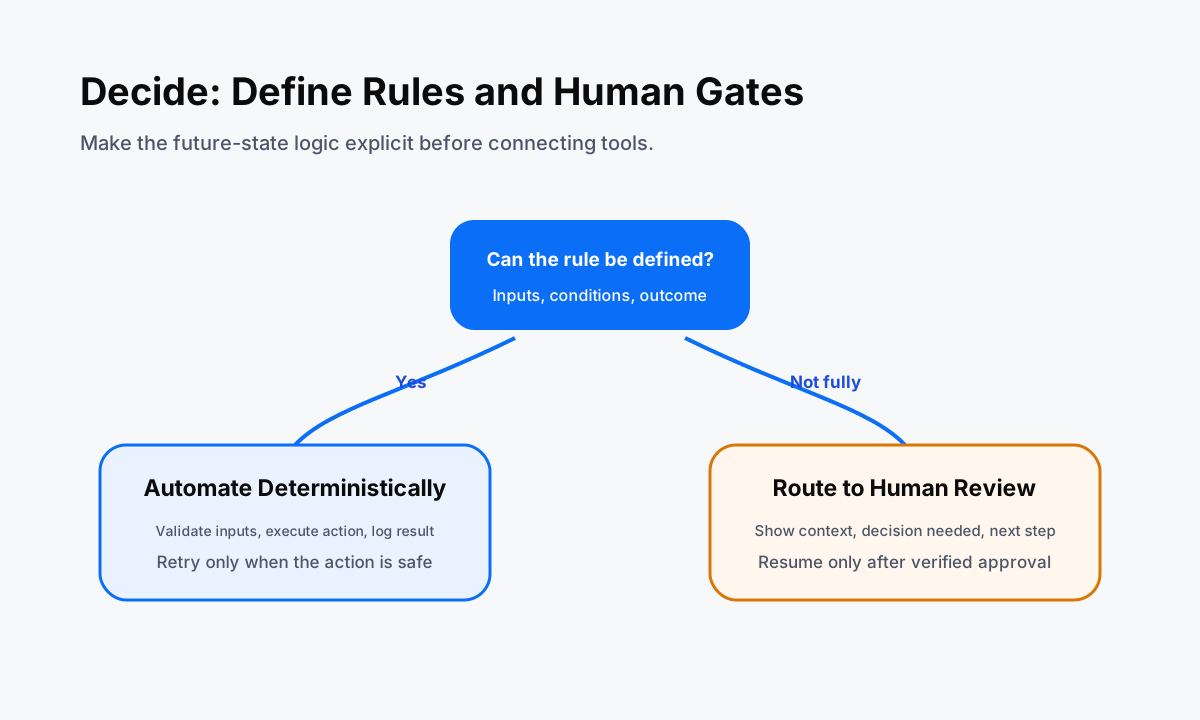
Decide which records can be updated automatically, which actions need approval, and what happens when data is missing. If a contact already exists, should the workflow update the record, create a task, or stop? If an email fails, should it retry, switch channels, or alert a person?
Those are design decisions, not implementation details.
Human checkpoints should also be explicit. Some work is deterministic enough to automate completely. Other work contains judgment, risk, or customer-facing commitments that deserve review. A useful design separates those paths instead of pretending everything should be autonomous. The result is a future-state process that shows where software acts, where a person decides, and how the system records the handoff.
Finish the Decide stage by defining the measurement plan. Choose the small set of fields that can tell you whether the future state is better than the current state. This can include cycle time, completion rate, exception count, manual touches, failed actions, or queue age. You are not predicting a result.
You are defining what evidence will be reviewed after launch. For a deeper implementation pattern, see our guide to CRM automation workflow design best practices.
Stage 3: Act by Building, Testing, and Deploying
Act is the implementation stage. The future-state design becomes an actual workflow with triggers, actions, data mappings, conditions, retries, logging, permissions, and ownership. Microsoft Power Automate's planning guidance splits this work into Make, Test, and Deploy and refine. That split is useful because a workflow is not ready merely because the builder can make it run once.
Build the smallest complete path first. Connect the trigger to the required systems, handle the primary decisions, and record enough state to understand what happened during a run. Then test the normal path and the edge cases identified during discovery.
Microsoft specifically recommends testing possible patterns and outcomes because an automation can complete without technically failing while still producing the wrong result. That is exactly the kind of defect that a simple green status can miss.
Test with representative data. Check duplicates, missing values, existing records, invalid inputs, permission failures, timeouts, and the conditions that send work to a person. Confirm idempotency where a retry could otherwise create a second contact, invoice, task, message, or appointment. Confirm that logs contain enough context to diagnose a failure without exposing secrets or unnecessary customer data.
Deployment should be controlled. Microsoft recommends staged deployment for automation so problems can be identified with a smaller group before everyone depends on the workflow. In practice, that means defining an owner, keeping a rollback path, watching the first production runs, and making sure people know what the system now owns.
HWA's implementation process follows the same principle: validate a contained capability before treating it as a dependable operating system.
Stage 4: Optimize with Production Evidence
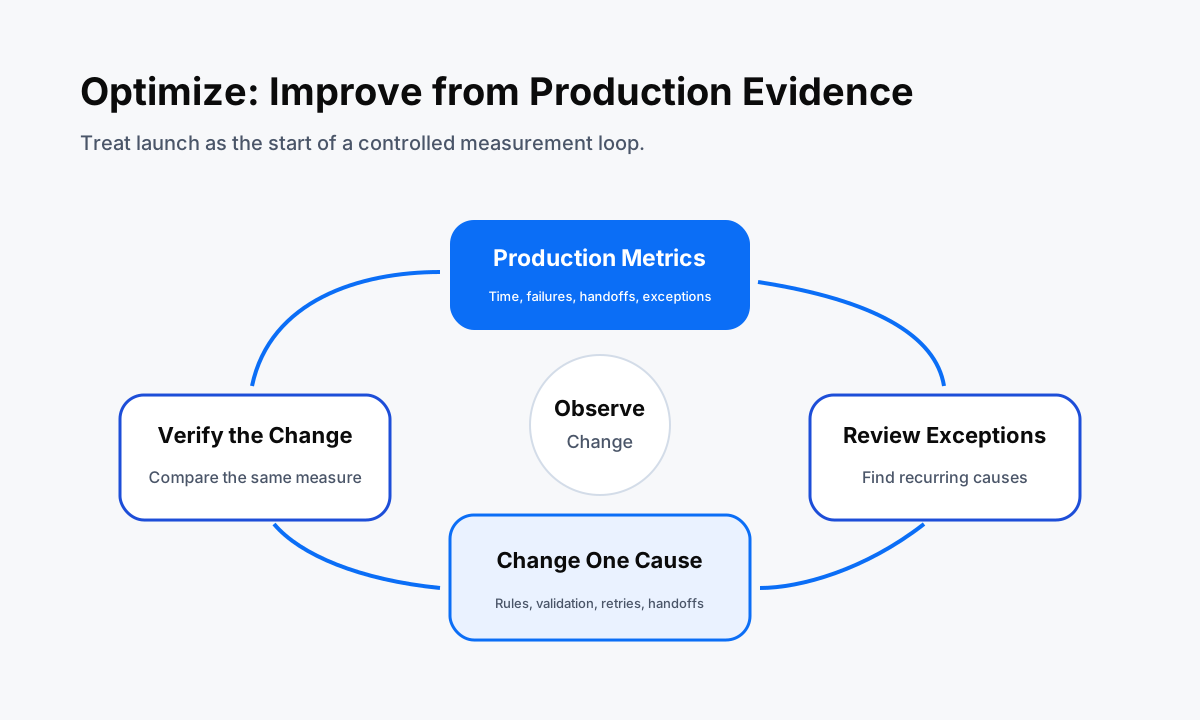
Optimization begins after real people and real records touch the workflow. IBM's guidance recommends measuring results and adapting in phases instead of assuming the first version is final. The reason is practical: production exposes patterns that are difficult to reproduce in a build environment. New exception types appear. Inputs drift.
Team behavior changes. A third-party system changes. A decision rule that looked clear may create too many manual reviews.
Review the measures chosen during Decide. If the problem was slow lead handling, inspect response time and queue age. If the problem was manual re-entry, inspect manual touches, duplicate records, and exceptions. If the problem was unreliable handoffs, inspect ownership changes, unresolved tasks, and failed actions. The workflow should produce evidence that points back to the original operating problem.
Then improve one cause at a time. You might tighten input validation, simplify a decision branch, add a retry, remove a redundant notification, move one approval earlier, or add a fallback when a provider is unavailable. Small controlled changes make it easier to understand what actually improved the process.
They also make rollback safer when a change creates a new failure mode.
Optimization is what turns an automation from a project into an operating capability. The system has an owner, a measurement loop, and a way to adapt when the business changes. That is also why a good automation stack needs monitoring and governance, not just connectors.
Our AI workflow automation for small business guide shows how that broader operating model fits together.
How to Tell Which Stage Your Business Is In
If you are unsure where to start, look for the first unanswered question in the sequence. If nobody can show the full current process, you are in Discover. If the process is documented but the team still debates rules, approvals, exceptions, ownership, or the target outcome, you are in Decide.
If the design is stable and the work is being built or tested, you are in Act. If the workflow is already handling production work and the team is reviewing its behavior, you are in Optimize.
Resist the urge to skip a stage because a platform makes building easy. Fast implementation is useful only when the process definition is strong enough to support it. A ten-minute flow that automates the wrong rule can create more cleanup than the manual process it replaced.
Likewise, a carefully designed workflow that never gets tested with edge cases is still unfinished.
The practical next step is to choose one recurring workflow and write a one-page process map. List the trigger, actors, systems, data, decisions, exceptions, handoffs, and the field you will measure. That single page will usually reveal whether the next task is more discovery, a design decision, a build, or an optimization experiment.
If you want help turning that map into a working system, review HWA's automation services or start with the workflow audit.
Related Automation Resources
Map the current process and identify the best automation opportunity.
Business Process Automation Pain PointsSee the operating problems that usually signal a process needs redesign.
CRM Workflow Design Best PracticesTurn triggers, rules, exceptions, and handoffs into a testable design.
HWA ProcessSee how a contained automation moves from validation into implementation.
FAQ
What are the 4 stages of process automation?
A practical four-stage model is Discover, Decide, Act, and Optimize. Discover maps the current process and finds the right opportunity. Decide defines rules, exceptions, ownership, and success measures. Act builds, tests, and deploys the workflow. Optimize uses production data and feedback to improve it over time.
Do all automation platforms use the same four stages?
No. IBM explicitly describes Discover, Decide, Act, and Optimize as four steps in business automation, while Microsoft Power Automate separates planning, design, making, testing, deployment, and refinement. The labels differ, but the operating logic is similar: understand the process, define the future state, implement safely, then improve from evidence.
Which process automation stage should a small business start with?
Start with Discover. Choose one recurring process, document the trigger, steps, owners, systems, exceptions, and current pain. That prevents a team from automating a vague or broken process before it understands what the workflow is supposed to accomplish.
When is a process ready to move from Decide to Act?
Move to Act when the trigger, required data, decision rules, exception paths, human approvals, system permissions, and success measures are clear enough to test. If important cases still depend on undocumented judgment, keep designing before building.
What should be measured during the Optimize stage?
Measure fields tied to the original problem. Useful examples include cycle time, response time, failed runs, manual handoffs, exception frequency, completion rate, duplicate records, and the amount of work that still requires a person. The metric should tell you whether the workflow is becoming more reliable and useful.
Sources
These primary sources informed the automation lifecycle and implementation details in this guide.
Want this mapped to your business?
HWA can audit the manual work behind your sales, ops, and customer follow-up systems, then turn the best opportunities into working automation.